A catalogue worth exploring
Organize products, variants and categories around how people shop. Give each item the descriptions, imagery and options it needs; use collections and page content to turn a catalogue into a considered shopping experience.

CREATE YOUR COMMERCE EXPERIENCE
Create an online store that carries your identity, tells your product story and gives customers a clear path to purchase. Your storefront is part of the same Agora business that manages the order after checkout.

INSIDE THE PLATFORM
BUILT AROUND THE WORK
Organize products, variants and categories around how people shop. Give each item the descriptions, imagery and options it needs; use collections and page content to turn a catalogue into a considered shopping experience.
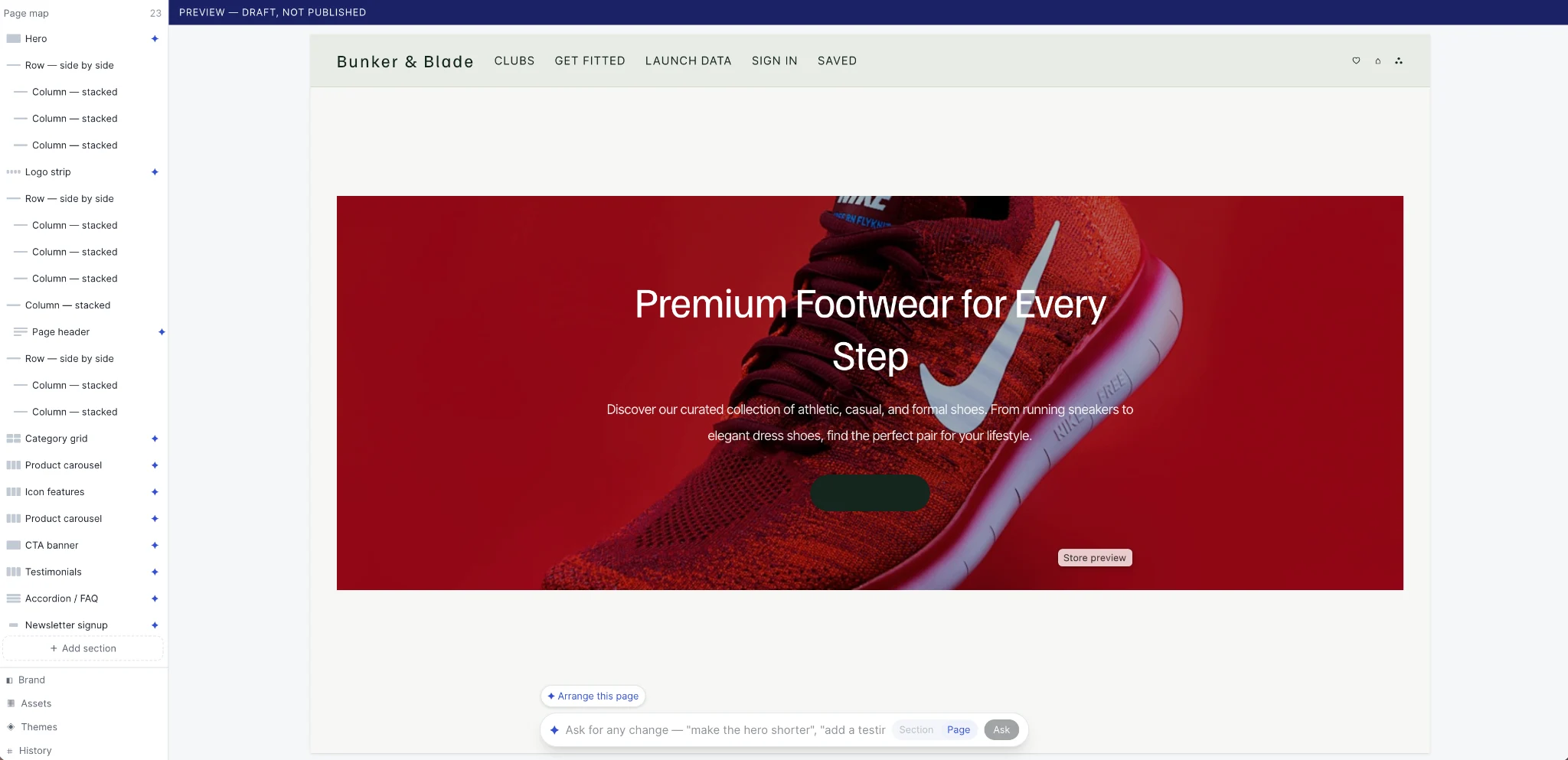
Use the store editor to arrange sections, inspect the customer view and refine the composition. Brand settings, content and merchandising belong in the same creative process, with a draft to review before publishing.
A storefront order belongs with your stock, customer and fulfillment records. Your team can follow the work behind the purchase rather than reconstruct it from separate dashboards.

THE BUSINESS BEHIND THE CAPABILITY
Good merchandising starts before the first click. Product names, options, images, availability and the next action need to agree. Review the storefront and the order it creates as one journey.
Each option needs an identifiable variant. Keep the item selected by the customer attached to the resulting order item.
Review customer information, delivery, the configured payment path and confirmation. A completed page design is only one part of launch readiness.
INSIDE ONLINE STORE
The store is where your product information becomes a customer decision. Build around the full journey: finding a collection, understanding an item, choosing an option, checking availability and placing the order. Content and commerce should help the same decision, while the resulting sale gives your team the information needed to act.
Organise products by category, brand and collection. Keep names, descriptions and images maintained in the business catalogue.
Represent meaningful options as variants so pricing and stock can refer to the item the customer actually selects.
Use page and reusable content workspaces to explain the brand, service and product story.
Choose a visual starting point and arrange sections in the editor rather than reducing the store to a fixed template.
Review account, address, delivery and payment as a single configured purchase journey.
Follow the order in business operations, with the customer, items and configured payment information in context.
FOLLOW THE BUSINESS JOURNEY
A brand introduces a new bag in two colours. The team prepares the product information and variants, builds a collection page and checks the mobile layout. The customer chooses a specific colour and completes the configured checkout. The operator works from the resulting order and item information, rather than treating the storefront as a separate website project.
| What happens | What the team needs to resolve |
|---|---|
| A variant is unavailable | Review the availability shown to the customer and the source stock record before offering another option. |
| Checkout is interrupted | Inspect the configured payment result and order state before retrying or confirming the purchase. |
| Content needs correction | Keep the draft and publishing responsibilities clear so a copy change does not become an uncontrolled release. |
CLOSER TO THE PRODUCT
Actual views supplied from Agora. Open each capture to inspect the controls and context. These views are separate from the interactive examples and their illustrative data.
PRODUCT SETUP
The supplied product form brings display name, slug, draft status, brand and category selection together.
SECTION LIBRARY
The section library exposes layout, commerce, media and content choices, including grids, tabs and FAQs.
FOLLOW THE PROCESS
Check product names, options, images and prices before arranging the customer experience.
Choose a theme, build the page structure and inspect desktop and mobile presentation.
Check discovery, product selection and the configured checkout, then follow the resulting order in your back office.
Operating walkthrough · Review the exact configuration for your business.
A CLEARER PICTURE
Yes. Agora provides theme, content and visual editing tools so the shopping experience represents your business.
Explore the native app workspace alongside the store. App configuration, distribution and plan inclusion should be agreed as part of your launch.
Catalogue structure, customer accounts, historic orders, domain ownership and existing URLs all belong in a migration assessment.
BUILD WITH AGORA
Bring your business, your ambition and the questions that matter. Let’s explore what you can build with Agora.