Start with the foundations
Set brand colours and type before tuning individual pages. Review contrast on real backgrounds, including buttons, labels and product information.

DESIGN / THEME STUDIO
Treat colour, typography, spacing and page composition as a system. The goal is a recognisable shopping experience that remains readable and easy to use.

BUILT AROUND THE WORK
Set brand colours and type before tuning individual pages. Review contrast on real backgrounds, including buttons, labels and product information.
Inspect long names, missing images and dense product detail. A layout that looks balanced with a short headline may fail on a real collection.
Check navigation, product selection and purchase actions on small screens. Keep key information visible without depending on hover or decorative motion.
THE DETAIL IN BUSINESS CONTEXT
A colour choice, product image and navigation pattern work together. Inspect long names, dense collections and small screens before activating a design.
Use the catalogue and real brand material when reviewing a theme. A short sample headline will not expose every layout issue.
Decide who reviews content, activates the experience and checks the customer journey after a change.
INSPECT THE RECORDS AND DECISIONS
Review the theme as a set of decisions: navigation, typography, product imagery, content density and buying actions. The finished storefront must work with the actual catalogue.
Operating concepts to inspect in your setup; this is not a wire-format schema. Exact API fields belong in the source-derived reference.
Test representative content rather than shortening every product to fit an attractive sample.
Review product, collection, navigation and checkout entry points together. Keep responsibility for activation explicit.
CLOSER TO THE PRODUCT
Actual views supplied from Agora. Open each capture to inspect the controls and context. These views are separate from the interactive examples and their illustrative data.
SECTION LIBRARY
The section library exposes layout, commerce, media and content choices, including grids, tabs and FAQs.
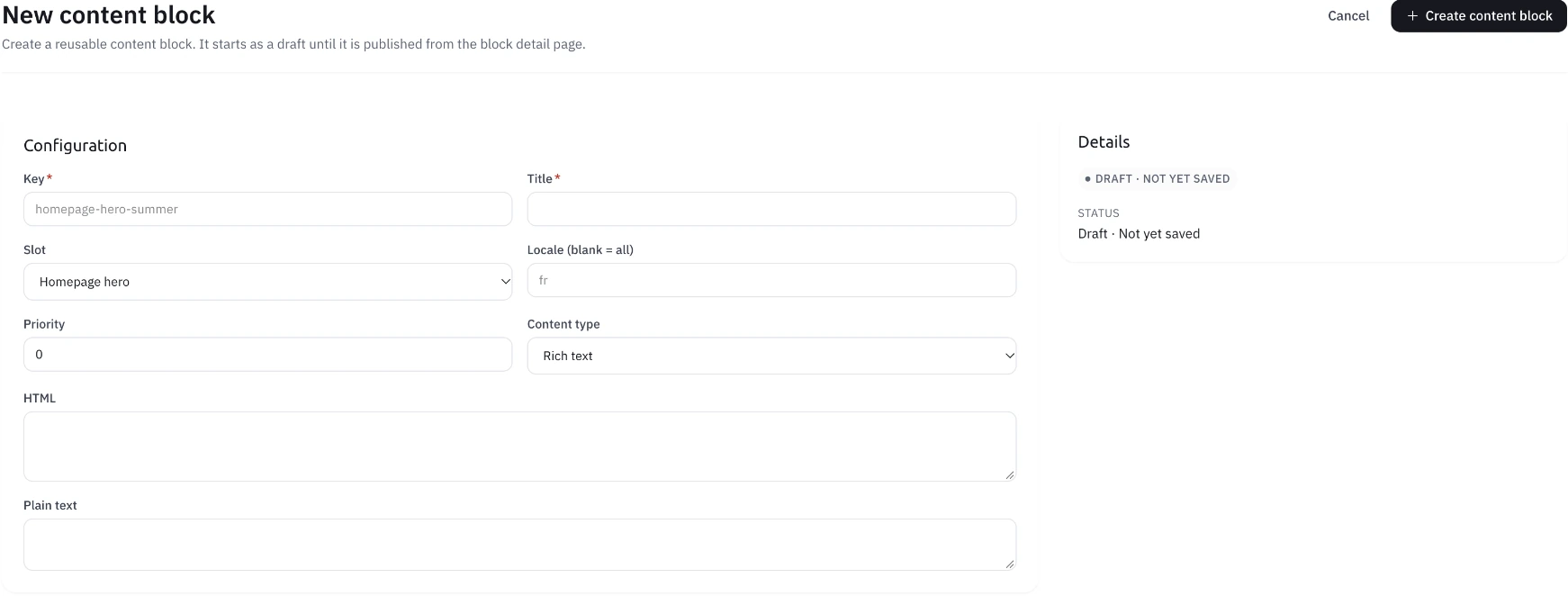
CONTENT BLOCK
This supplied content form exposes a slot, locale, priority and draft state, with rich text, HTML and plain-text fields.
REUSABLE CONTENT
The CMS form shows a block key, placement, content and locale. This is a creation interface, rather than evidence of a published block.
FOLLOW THE PROCESS
Apply the brand palette and typography in Theme Studio.
Arrange sections around discovery, product information and buying.
Check the relevant devices and follow the activation workflow for your environment.
Operating walkthrough · Review the exact configuration for your business.
A CLEARER PICTURE
Review the app brand controls alongside your storefront identity; each surface has its own layout needs.
No. Keep identity consistent while giving different buying tasks the layout they need.
BUILD WITH AGORA
Bring your business, your ambition and the questions that matter. Let’s explore what you can build with Agora.