Own the commercial arrangement
Agree which developer accounts are used and who owns access, store listings and release decisions. Confirm any app-service costs separately from platform subscription fees.

MOBILE / LAUNCH
Plan the responsibilities behind a branded app: developer accounts, store assets, device tests, privacy information, review and ongoing releases.

BUILT AROUND THE WORK
Agree which developer accounts are used and who owns access, store listings and release decisions. Confirm any app-service costs separately from platform subscription fees.
Store descriptions, screenshots, support details and privacy disclosures need to describe the actual app. Test account access, checkout and the required review journey.
Operating-system changes, store requirements and product updates continue after launch. Decide who tests, submits and supports subsequent versions.
THE DETAIL IN BUSINESS CONTEXT
The app deserves its own navigation and interaction. It also belongs to the same catalogue and order operation as the rest of your business.
Review browsing, product options, account access, cart and checkout on actual devices.
Keep developer-account ownership, listing assets, release review and maintenance responsibility explicit.
INSPECT THE RECORDS AND DECISIONS
A native app needs a product experience and a release arrangement. Establish the business accounts, review responsibilities and maintenance process before announcing a launch.
Operating concepts to inspect in your setup; this is not a wire-format schema. Exact API fields belong in the source-derived reference.
Respond with the behaviour of the actual submitted build and the applicable business model. Do not treat submission as approval.
Plan device testing, platform updates, support and ownership of future submissions. Confirm which work your agreement includes.
CLOSER TO THE PRODUCT
Actual views supplied from Agora. Open each capture to inspect the controls and context. These views are separate from the interactive examples and their illustrative data.
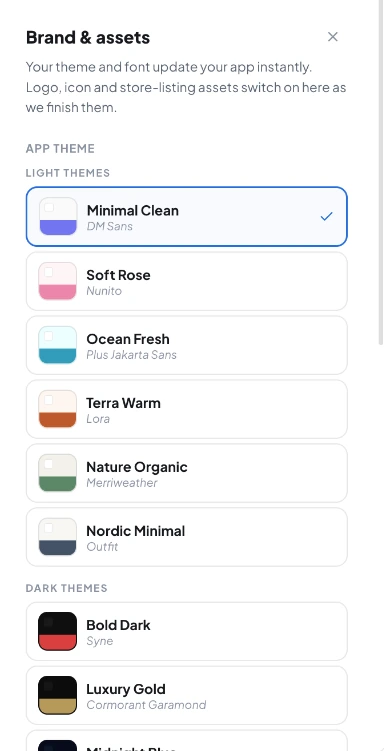
APP STYLING
The supplied brand drawer offers theme and font choices. Its note identifies logo, icon and store-listing assets as still being completed in that captured version.
FOLLOW THE PROCESS
Establish the organisation and access needed for distribution.
Review listing assets and end-to-end behaviour on real devices.
Follow store review, resolve questions and define update responsibility.
Operating walkthrough · Review the exact configuration for your business.
A CLEARER PICTURE
No. Submission readiness can be planned; store review outcomes and timing remain external.
Confirm account, publishing and maintenance charges in your agreement.
BUILD WITH AGORA
Bring your business, your ambition and the questions that matter. Let’s explore what you can build with Agora.